Is Your Facebook Custom Event Killing Optimization? 3 Common Tracking Mistakes
Is Your Facebook Custom Event Killing Optimization? 3 Common Tracking Mistakes
Written by

Rafael Hernandez
3 min read

In this post:
In this post:
Section
Turn Ad Spend Into Signed Cases
Turn Ad Spend Into Signed Cases
We blend AI-driven testing with proven performance strategy to attract qualified traffic and turn it into revenue—fast, trackable, and scalable.
Spanish MVA Leads — get exclusive, high-intent cases from the untapped Hispanic market. (New!)
Facebook & Instagram Ads — reach customers where they scroll.
Google Ads — capture people actively searching for you.
Website Design — turn visitors into buyers with high-converting sites.
AI Automations — save hours and never miss a follow-up.
Email Marketing — nurture leads and close sales on autopilot.
SEO — get found by customers searching for what you sell.
We blend AI-driven testing with proven performance strategy to attract qualified traffic and turn it into revenue—fast, trackable, and scalable.
Spanish MVA Leads — get exclusive, high-intent cases from the untapped Hispanic market. (New!)
Facebook & Instagram Ads — reach customers where they scroll.
Google Ads — capture people actively searching for you.
Website Design — turn visitors into buyers with high-converting sites.
AI Automations — save hours and never miss a follow-up.
Email Marketing — nurture leads and close sales on autopilot.
SEO — get found by customers searching for what you sell.
Key Takeaways
Volume is Mandatory: A facebook custom event generally needs 50 to 100 conversions per week to provide enough data for the algorithm to optimize effectively.
Prioritize Standard Events: Always check the facebook pixel standard events list and use predefined events like "Purchase" or "Complete Registration" whenever possible.
Match Intent to Event: Do not use generic "Lead" events for everything. Use "Schedule" for calls and "Complete Registration" for content downloads to improve facebook ads tracking.
Distinguish Conversion Types: Understand that a custom conversion is a URL rule, while a custom event is a code fired signal.
Deep Funnel Optimization: If you lack data volume, move up the funnel (e.g., from Purchase to Add to Cart) rather than creating a low volume facebook custom event.
Volume is Mandatory: A facebook custom event generally needs 50 to 100 conversions per week to provide enough data for the algorithm to optimize effectively.
Prioritize Standard Events: Always check the facebook pixel standard events list and use predefined events like "Purchase" or "Complete Registration" whenever possible.
Match Intent to Event: Do not use generic "Lead" events for everything. Use "Schedule" for calls and "Complete Registration" for content downloads to improve facebook ads tracking.
Distinguish Conversion Types: Understand that a custom conversion is a URL rule, while a custom event is a code fired signal.
Deep Funnel Optimization: If you lack data volume, move up the funnel (e.g., from Purchase to Add to Cart) rather than creating a low volume facebook custom event.
Is Your Facebook Custom Event Killing Optimization? 3 Common Tracking Mistakes
Are you running Facebook ads but struggling to exit the learning phase? The issue might not be your creative or your ad copy. It could be how you are defining success to Meta's algorithm. Many marketers struggle with the decision of whether to use a Facebook custom event or a standard event. Making the wrong choice can confuse the machine learning models and burn through your budget without delivering tangible results.
If you are an advertising agency in Los Angeles, you know that precise data is the fuel for any successful campaign. Without clear signals, Meta cannot find your ideal customers. This guide breaks down exactly when to use specific events, how to avoid common pitfalls, and the strategy behind matching events to user intent.
Standard Events vs. Custom Events: The Core Difference
To master Facebook ads tracking, you must first understand the language Meta speaks. Standard events are the 17 predefined actions that Meta’s algorithm inherently understands. These include actions like Purchase, Lead, Complete Registration, and Add to Cart.
When you trigger a standard event, Meta knows exactly what is happening. For instance, the algorithm knows that a "Purchase" involves a transaction. It has a predetermined notion of what that user behavior looks like across its massive dataset. This means it can find other users likely to take that same action much faster.
In contrast, a Facebook custom event is an action that you define yourself because it does not fit into the standard categories. If you create a custom event called "Lead Magnet A Download," Meta has no initial context for what this means. It does not know if this is a high value action or a casual interaction until it collects enough data points.
The Facebook Pixel Standard Events List
Before creating something new, always consult the Facebook pixel standard events list to see if your goal is already covered. The list includes:
View Content
Search
Add to Cart
Add to Wishlist
Initiate Checkout
Add Payment Info
Purchase
Lead
Complete Registration
Subscribe
Start Trial
Submit Application
Schedule
Contact
Donate
Customize Product
Find Location
Using these meta standard events is usually the safer bet for most campaigns because you are leveraging Meta's existing machine learning infrastructure.
The 50 Conversion Rule: Why Volume Matters
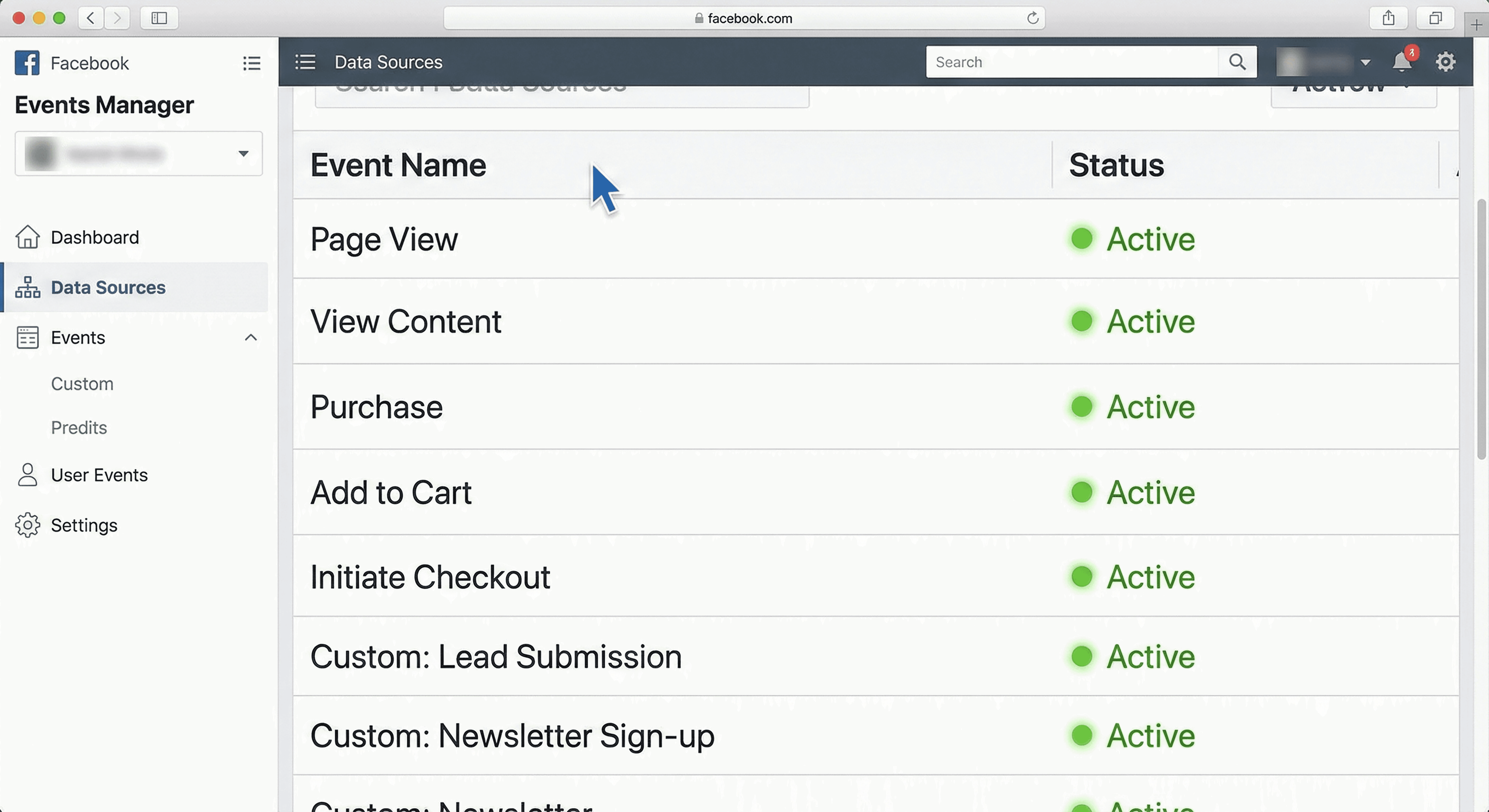
The biggest mistake marketers make is optimizing for a conversion event that lacks sufficient data. This is where the 50 conversions per week rule Facebook comes into play.
For Meta’s algorithm to effectively find more customers, it needs about 50 to 100 conversions per week per ad set. If you optimize for a Facebook custom event that only happens five times a week, the system is flying blind. It simply does not have enough signal to identify patterns among the converters.
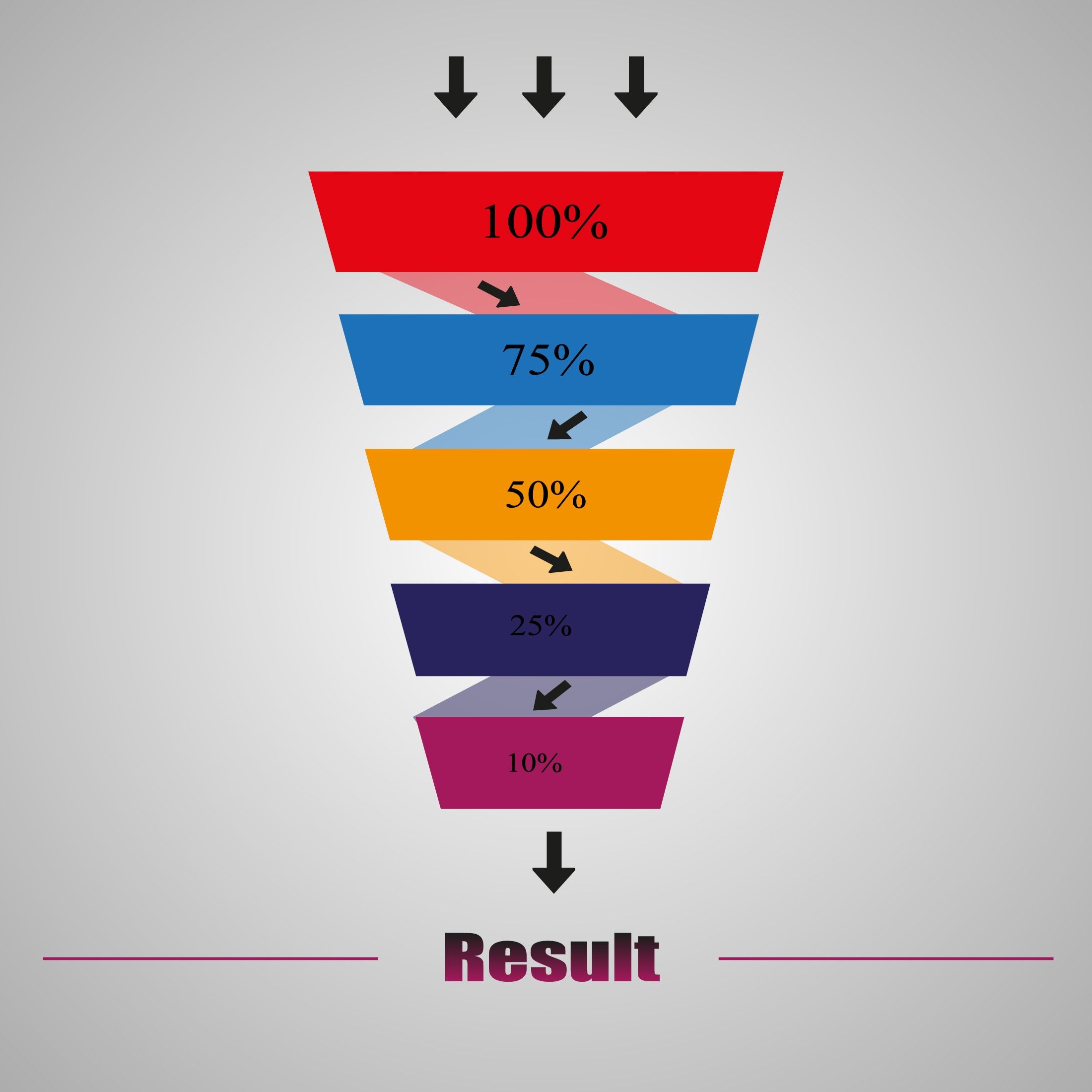
In these cases of common Facebook tracking mistakes, you should move up the funnel. This is a concept known as Facebook ads deep funnel optimization. If you cannot get 100 purchases, optimize for "Initiate Checkout" or "Add to Cart."
If you are running Facebook advertising in Los Angeles, where competition is fierce, giving the algorithm more data points is often the secret to lowering your Cost Per Acquisition (CPA). Always AB test optimizing for the deeper funnel event versus the mid funnel event. Sometimes, optimizing for a higher volume event like "Initiate Checkout" actually lowers your CPA for purchases because the algorithm has more data to work with.
Matching Event to User Intent
Another critical aspect of facebook ads event intent matching is aligning the specific event with the user's actual mindset. A generic "Lead" event is often too broad.
Lead: General information collection.
Complete Registration: Giving access to a specific asset like a PDF, course, or webinar.
Schedule: Booking a meeting or consultation.
If you group all these under "Lead," you are muddying the waters. For example, our advertising agency in California runs lead magnet ads. We optimize specifically for "Complete Registration" because we are granting access to a free asset. This tells the algorithm we want people who register for things, not just people who fill out any random form.
Custom Events vs. Custom Conversions
Many advertisers confuse a Facebook custom event with a custom conversion. They are different tools for different jobs.
A custom event is a signal sent via code. You might use a Facebook custom event code example inside Google Tag Manager to fire a signal when a user clicks a specific button or watches a video.
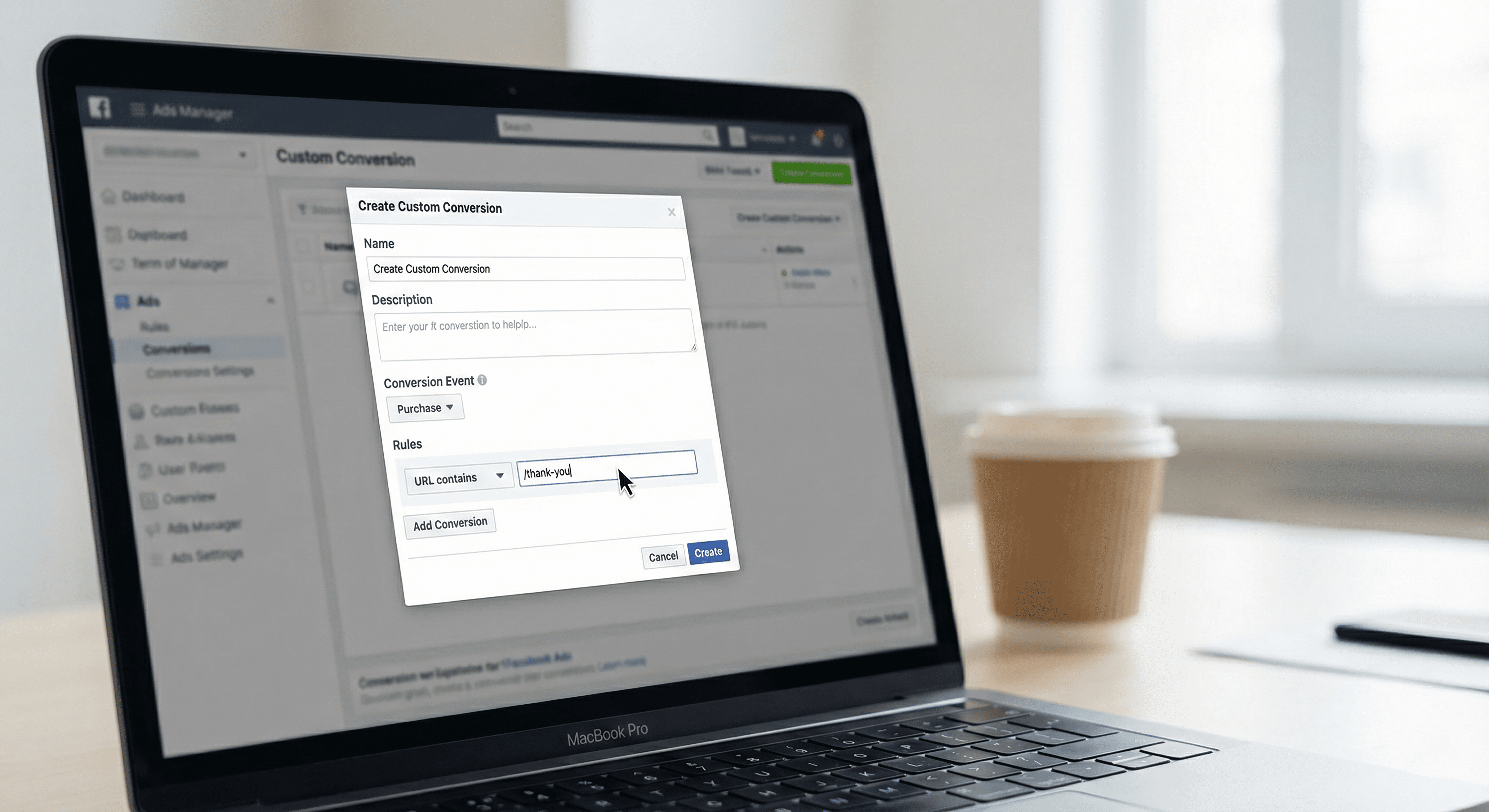
A custom conversion, on the other hand, is a filter or a rule inside of Meta that turns an existing event or URL into a conversion goal. You can set this up easily by creating custom conversions in ads manager. For example, you can take the standard "Complete Registration" event and create a rule that says: "Count this as a Custom Conversion ONLY if the URL contains /thank-you-webinar."
This allows you to track specific url Facebook pixel data without adding new code to your website. If you are managing Facebook ads in California for clients with restrictive website backends, custom conversions are a lifesaver.
When to Actually Use a Facebook Custom Event
Despite the benefits of standard events, there are specific scenarios where a facebook custom event is the superior choice.
Tracking Multiple Lead Magnets: If you are tracking multiple lead magnets separately (e.g., Lead Magnet A vs. Lead Magnet B), a custom event allows you to distinguish between them clearly in your reporting.
Advanced Retargeting: You can use custom events for retargeting audiences based on behavior. For instance, firing an event when a user scrolls 50% of your page or watches a specific VSL allows you to retarget high-intent non-buyers.
Unique Actions: If you want to track a brand new action that doesn't map to meta pixel standard events definitions, such as "started quiz" or "opened calculator," a custom event is necessary.
Implementation: How to Set It Up
The easiest way to implement these events without a developer is by learning how to use gtm for facebook ads (Google Tag Manager). GTM allows you to create triggers based on clicks, visibility, or timers and then fire the corresponding custom events facebook pixel tag.
However, remember to check your facebook pixel event match quality. High match quality ensures that the data you send is actually being matched to real Facebook user profiles, which is essential for accurate attribution.
Is Your Facebook Custom Event Killing Optimization? 3 Common Tracking Mistakes
Are you running Facebook ads but struggling to exit the learning phase? The issue might not be your creative or your ad copy. It could be how you are defining success to Meta's algorithm. Many marketers struggle with the decision of whether to use a Facebook custom event or a standard event. Making the wrong choice can confuse the machine learning models and burn through your budget without delivering tangible results.
If you are an advertising agency in Los Angeles, you know that precise data is the fuel for any successful campaign. Without clear signals, Meta cannot find your ideal customers. This guide breaks down exactly when to use specific events, how to avoid common pitfalls, and the strategy behind matching events to user intent.
Standard Events vs. Custom Events: The Core Difference
To master Facebook ads tracking, you must first understand the language Meta speaks. Standard events are the 17 predefined actions that Meta’s algorithm inherently understands. These include actions like Purchase, Lead, Complete Registration, and Add to Cart.
When you trigger a standard event, Meta knows exactly what is happening. For instance, the algorithm knows that a "Purchase" involves a transaction. It has a predetermined notion of what that user behavior looks like across its massive dataset. This means it can find other users likely to take that same action much faster.
In contrast, a Facebook custom event is an action that you define yourself because it does not fit into the standard categories. If you create a custom event called "Lead Magnet A Download," Meta has no initial context for what this means. It does not know if this is a high value action or a casual interaction until it collects enough data points.
The Facebook Pixel Standard Events List
Before creating something new, always consult the Facebook pixel standard events list to see if your goal is already covered. The list includes:
View Content
Search
Add to Cart
Add to Wishlist
Initiate Checkout
Add Payment Info
Purchase
Lead
Complete Registration
Subscribe
Start Trial
Submit Application
Schedule
Contact
Donate
Customize Product
Find Location
Using these meta standard events is usually the safer bet for most campaigns because you are leveraging Meta's existing machine learning infrastructure.
The 50 Conversion Rule: Why Volume Matters
The biggest mistake marketers make is optimizing for a conversion event that lacks sufficient data. This is where the 50 conversions per week rule Facebook comes into play.
For Meta’s algorithm to effectively find more customers, it needs about 50 to 100 conversions per week per ad set. If you optimize for a Facebook custom event that only happens five times a week, the system is flying blind. It simply does not have enough signal to identify patterns among the converters.
In these cases of common Facebook tracking mistakes, you should move up the funnel. This is a concept known as Facebook ads deep funnel optimization. If you cannot get 100 purchases, optimize for "Initiate Checkout" or "Add to Cart."
If you are running Facebook advertising in Los Angeles, where competition is fierce, giving the algorithm more data points is often the secret to lowering your Cost Per Acquisition (CPA). Always AB test optimizing for the deeper funnel event versus the mid funnel event. Sometimes, optimizing for a higher volume event like "Initiate Checkout" actually lowers your CPA for purchases because the algorithm has more data to work with.
Matching Event to User Intent
Another critical aspect of facebook ads event intent matching is aligning the specific event with the user's actual mindset. A generic "Lead" event is often too broad.
Lead: General information collection.
Complete Registration: Giving access to a specific asset like a PDF, course, or webinar.
Schedule: Booking a meeting or consultation.
If you group all these under "Lead," you are muddying the waters. For example, our advertising agency in California runs lead magnet ads. We optimize specifically for "Complete Registration" because we are granting access to a free asset. This tells the algorithm we want people who register for things, not just people who fill out any random form.
Custom Events vs. Custom Conversions
Many advertisers confuse a Facebook custom event with a custom conversion. They are different tools for different jobs.
A custom event is a signal sent via code. You might use a Facebook custom event code example inside Google Tag Manager to fire a signal when a user clicks a specific button or watches a video.
A custom conversion, on the other hand, is a filter or a rule inside of Meta that turns an existing event or URL into a conversion goal. You can set this up easily by creating custom conversions in ads manager. For example, you can take the standard "Complete Registration" event and create a rule that says: "Count this as a Custom Conversion ONLY if the URL contains /thank-you-webinar."
This allows you to track specific url Facebook pixel data without adding new code to your website. If you are managing Facebook ads in California for clients with restrictive website backends, custom conversions are a lifesaver.
When to Actually Use a Facebook Custom Event
Despite the benefits of standard events, there are specific scenarios where a facebook custom event is the superior choice.
Tracking Multiple Lead Magnets: If you are tracking multiple lead magnets separately (e.g., Lead Magnet A vs. Lead Magnet B), a custom event allows you to distinguish between them clearly in your reporting.
Advanced Retargeting: You can use custom events for retargeting audiences based on behavior. For instance, firing an event when a user scrolls 50% of your page or watches a specific VSL allows you to retarget high-intent non-buyers.
Unique Actions: If you want to track a brand new action that doesn't map to meta pixel standard events definitions, such as "started quiz" or "opened calculator," a custom event is necessary.
Implementation: How to Set It Up
The easiest way to implement these events without a developer is by learning how to use gtm for facebook ads (Google Tag Manager). GTM allows you to create triggers based on clicks, visibility, or timers and then fire the corresponding custom events facebook pixel tag.
However, remember to check your facebook pixel event match quality. High match quality ensures that the data you send is actually being matched to real Facebook user profiles, which is essential for accurate attribution.
FAQs
What are meta standard events and why should I use them?
Meta standard events are predefined actions like Purchase, Lead, or Add to Cart that Facebook's algorithm already recognizes. You should use them because Meta has billions of data points on these behaviors, allowing the algorithm to optimize your ads faster and find potential customers more efficiently than with a facebook custom event.
How does the 50 conversions per week rule affect my facebook custom event?
The 50 conversions per week rule facebook states that an ad set needs roughly 50 conversions weekly to exit the learning phase. If your facebook custom event generates fewer than this, the algorithm struggles to learn who your ideal customer is, leading to unstable performance and higher costs.
Can I use custom conversions instead of custom events?
Yes, and it is often easier. Creating custom conversions in ads manager allows you to track actions based on URL rules (like visiting a specific thank you page) without adding code to your site. This is perfect for conversion tracking for webinars or specific offers where the user lands on a unique page.
What is the best strategy for standard events for ecommerce?
For standard events for ecommerce, you should implement the full funnel: View Content, Add to Cart, Initiate Checkout, and Purchase. If you have low volume on Purchases, try view content vs add to cart optimization or Initiate Checkout to give the algorithm more data to work with while you scale.
How do I scale smarter facebook ads tips using events?
To scale smarter facebook ads tips, practice facebook ads split testing events. Run one ad set optimizing for your primary goal (e.g., Purchase) and another optimizing for a step higher in the funnel (e.g., Initiate Checkout). Often, the higher volume event provides the stability needed to scale budget without breaking the algorithm.
What are meta standard events and why should I use them?
Meta standard events are predefined actions like Purchase, Lead, or Add to Cart that Facebook's algorithm already recognizes. You should use them because Meta has billions of data points on these behaviors, allowing the algorithm to optimize your ads faster and find potential customers more efficiently than with a facebook custom event.
How does the 50 conversions per week rule affect my facebook custom event?
The 50 conversions per week rule facebook states that an ad set needs roughly 50 conversions weekly to exit the learning phase. If your facebook custom event generates fewer than this, the algorithm struggles to learn who your ideal customer is, leading to unstable performance and higher costs.
Can I use custom conversions instead of custom events?
Yes, and it is often easier. Creating custom conversions in ads manager allows you to track actions based on URL rules (like visiting a specific thank you page) without adding code to your site. This is perfect for conversion tracking for webinars or specific offers where the user lands on a unique page.
What is the best strategy for standard events for ecommerce?
For standard events for ecommerce, you should implement the full funnel: View Content, Add to Cart, Initiate Checkout, and Purchase. If you have low volume on Purchases, try view content vs add to cart optimization or Initiate Checkout to give the algorithm more data to work with while you scale.
How do I scale smarter facebook ads tips using events?
To scale smarter facebook ads tips, practice facebook ads split testing events. Run one ad set optimizing for your primary goal (e.g., Purchase) and another optimizing for a step higher in the funnel (e.g., Initiate Checkout). Often, the higher volume event provides the stability needed to scale budget without breaking the algorithm.
Conclusion
Choosing between a facebook custom event and a standard event is not just a technical preference; it is a strategic decision that impacts your bottom line. Standard events should be your default because they leverage Meta's massive historical data. Only switch to custom events when you have the specific need (like separating lead magnets) and the volume to support it.
If you are a business owner or a Los Angeles ad agency looking to scale, start by auditing your events. Are you confusing the algorithm with low volume custom events? Are you mismatching intent? Fix these common facebook tracking mistakes, and you will likely see your campaign performance stabilize and grow.
If you found this blog helpful, you’ll also benefit from reading this blog Facebook Ads That Convert: 3 Proven Psychology Tricks You Need to Know.
Ready to take your tracking to the next level? If you need a professional audit, our facebook advertising agency is here to help you unlock the full potential of your data.
Choosing between a facebook custom event and a standard event is not just a technical preference; it is a strategic decision that impacts your bottom line. Standard events should be your default because they leverage Meta's massive historical data. Only switch to custom events when you have the specific need (like separating lead magnets) and the volume to support it.
If you are a business owner or a Los Angeles ad agency looking to scale, start by auditing your events. Are you confusing the algorithm with low volume custom events? Are you mismatching intent? Fix these common facebook tracking mistakes, and you will likely see your campaign performance stabilize and grow.
If you found this blog helpful, you’ll also benefit from reading this blog Facebook Ads That Convert: 3 Proven Psychology Tricks You Need to Know.
Ready to take your tracking to the next level? If you need a professional audit, our facebook advertising agency is here to help you unlock the full potential of your data.
Want this done for you? Our team turns Meta & Google ads into profitable, scalable growth using AI-powered strategy. Hire us.
Author:
Rafael Hernandez
|
CEO and Co-Founder of Great Marketing AI
Published:
About the author
Rafael Hernandez
Rafael Hernandez is the CEO and Founder of Great Marketing AI, an agency built to fuse technical excellence with creative firepower. A UC Berkeley graduate and former Microsoft engineer, Rafael combines world-class marketing with AI-powered systems that turn clicks into clients. He leads with speed, high standards, and a commitment to meaningful results.
About the Author
Rafael Hernandez
Rafael Hernandez is the CEO and Founder of Great Marketing AI, an agency built to fuse technical excellence with creative firepower. A UC Berkeley graduate and former Microsoft engineer, Rafael combines world-class marketing with AI-powered systems that turn clicks into clients. He leads with speed, high standards, and a commitment to meaningful results.
Ready to Scale Your Law Firm with Exclusive Leads?
Stop chasing low-quality leads. Partner with the #1 Hispanic Marketing Agency to capture the untapped Spanish-speaking MVA market.
About Great Marketing AI
Great Marketing AI is a specialized legal and hispanic marketing agency focused on helping law firms dominate the Hispanic market. We combine advanced data analytics with cultural expertise to generate high-intent Spanish MVA leads that convert into signed cases.
Case Studies

NP Digital: 800% Growth & 81% Cost Reduction in 5 Days
When a leading performance-marketing agency (NP Digital) discovered their own Meta ads were under-performing, they partnered with Great Marketing AI.
In just five days we rebuilt their campaigns—better targeting, scroll-stopping creative, and pixel optimization.
The result? 63 conversions (vs 7) + cost per result down from $284.77 to $52.74 + click-through rate up 71.7%.
Albert Preciado: 435% Revenue Surge • 526% Sales Growth
After relying on Instagram “boosts,” Albert’s business was stuck in visibility mode—not high-conversion mode. We stepped in with a full funnel makeover: precise Meta Ads targeting, Hyros tracking, and high-impact creative.
• $373 ,982 in revenue in 3 months = 2.89x ROAS (435% up)
• 6,228 leads (up 289%)
• 338 sales (up 526%)
• 798 qualified calls (up 375%)
• CPA down 41% to $779.71
Turning Steel into Gold” – 1,956% ROI & 20.56× ROAS
When Complex Steel Buildings, a Southern-California custom-steel-structure manufacturer, needed to scale and streamline their lead-generation process, we partnered with them to implement
• A hyper-targeted Meta Ads-based campaign
• Friction-free on-platform lead-capture
• Fully automated follow-up using GoHighLevel
The result: $12.2 K ad spend → $251 K in sales in 6 months (1,956% ROI) with 20.56× ROAS.

Nestor Gutierrez: 11× ROAS • Coaching Offer Launched in Days
With only $1,619 in ad spend, Great Marketing AI generated 105 lead-form submissions, 98 high-quality leads, and closed 9 deals for Nestor—delivering $17,768 in revenue and a Cost-Per-Sale of just $179.92.From an unlaunched offer to a predictable revenue system—built using Meta Ads + streamlined follow-up automation.

KCB Plumbing: 375% More Organic Traffic • 119% Direct Uplift in 90 Days
KCB was spending money on ads—but conversions stagnated. Great Marketing AI rebuilt their digital foundation: rewriting messaging, redesigning the site with conversion in mind, and layering AI-driven CRO best practices.• Direct traffic users up 119.23% in 90 days.
• Organic search users increased 375% in the same period.
• Engaged sessions from organic search jumped 400%; average engagement time up 114.94%.

8.16× ROAS • $14,500 Revenue from Just $1.8K Ad Spend
Faced with no consistent way to attract high-ticket coaching clients, Palomino turned to Great Marketing AI. We built a full-funnel acquisition engine — from precision Meta Ads to AI-powered content and automated lead-nurture workflows.
• 192 qualified opportunities created in the funnel.
• $1,775.70 ad spend → $14,500 in revenue.
• Cost per Sale (CPS): $887.85 — efficient for a premium coaching program.

The Kitchen Store: Website Remodel That Revamped Lead Flow
With 60 years of showroom legacy in Culver City, The Kitchen Store had solid prestige—but their website wasn’t doing it justice. Great Marketing AI stepped in and turned the digital storefront into a real conversion engine.
• Outdated site → full redesign: high-end visuals, mobile optimization, trust elements up front.
• Simplified the buyer journey: prominent CTA “Schedule a FREE Design Consultation,” easier forms, sticky navigation.
• Early wins: more form submissions, deeper engagement, improved handoff from ads to conversion.
NP Digital: 800% Growth & 81% Cost Reduction in 5 Days
When a leading performance-marketing agency (NP Digital) discovered their own Meta ads were under-performing, they partnered with Great Marketing AI.
In just five days we rebuilt their campaigns—better targeting, scroll-stopping creative, and pixel optimization.
The result? 63 conversions (vs 7) + cost per result down from $284.77 to $52.74 + click-through rate up 71.7%.Albert Preciado: 435% Revenue Surge • 526% Sales Growth
After relying on Instagram “boosts,” Albert’s business was stuck in visibility mode—not high-conversion mode. We stepped in with a full funnel makeover: precise Meta Ads targeting, Hyros tracking, and high-impact creative.
• $373 ,982 in revenue in 3 months = 2.89x ROAS (435% up)
• 6,228 leads (up 289%)
• 338 sales (up 526%)
• 798 qualified calls (up 375%)
• CPA down 41% to $779.71
Turning Steel into Gold” – 1,956% ROI & 20.56× ROAS
When Complex Steel Buildings, a Southern-California custom-steel-structure manufacturer, needed to scale and streamline their lead-generation process, we partnered with them to implement
• A hyper-targeted Meta Ads-based campaign
• Friction-free on-platform lead-capture
• Fully automated follow-up using GoHighLevel
The result: $12.2 K ad spend → $251 K in sales in 6 months (1,956% ROI) with 20.56× ROAS.
Nestor Gutierrez: 11× ROAS • Coaching Offer Launched in Days
With only $1,619 in ad spend, Great Marketing AI generated 105 lead-form submissions, 98 high-quality leads, and closed 9 deals for Nestor—delivering $17,768 in revenue and a Cost-Per-Sale of just $179.92.From an unlaunched offer to a predictable revenue system—built using Meta Ads + streamlined follow-up automation.
KCB Plumbing: 375% More Organic Traffic • 119% Direct Uplift in 90 Days
KCB was spending money on ads—but conversions stagnated. Great Marketing AI rebuilt their digital foundation: rewriting messaging, redesigning the site with conversion in mind, and layering AI-driven CRO best practices.• Direct traffic users up 119.23% in 90 days.
• Organic search users increased 375% in the same period.
• Engaged sessions from organic search jumped 400%; average engagement time up 114.94%.
8.16× ROAS • $14,500 Revenue from Just $1.8K Ad Spend
Faced with no consistent way to attract high-ticket coaching clients, Palomino turned to Great Marketing AI. We built a full-funnel acquisition engine — from precision Meta Ads to AI-powered content and automated lead-nurture workflows.
• 192 qualified opportunities created in the funnel.
• $1,775.70 ad spend → $14,500 in revenue.
• Cost per Sale (CPS): $887.85 — efficient for a premium coaching program.
The Kitchen Store: Website Remodel That Revamped Lead Flow
With 60 years of showroom legacy in Culver City, The Kitchen Store had solid prestige—but their website wasn’t doing it justice. Great Marketing AI stepped in and turned the digital storefront into a real conversion engine.
• Outdated site → full redesign: high-end visuals, mobile optimization, trust elements up front.
• Simplified the buyer journey: prominent CTA “Schedule a FREE Design Consultation,” easier forms, sticky navigation.
• Early wins: more form submissions, deeper engagement, improved handoff from ads to conversion.
NP Digital: 800% Growth & 81% Cost Reduction in 5 Days
When a leading performance-marketing agency (NP Digital) discovered their own Meta ads were under-performing, they partnered with Great Marketing AI.
In just five days we rebuilt their campaigns—better targeting, scroll-stopping creative, and pixel optimization.
The result? 63 conversions (vs 7) + cost per result down from $284.77 to $52.74 + click-through rate up 71.7%.Albert Preciado: 435% Revenue Surge • 526% Sales Growth
After relying on Instagram “boosts,” Albert’s business was stuck in visibility mode—not high-conversion mode. We stepped in with a full funnel makeover: precise Meta Ads targeting, Hyros tracking, and high-impact creative.
• $373 ,982 in revenue in 3 months = 2.89x ROAS (435% up)
• 6,228 leads (up 289%)
• 338 sales (up 526%)
• 798 qualified calls (up 375%)
• CPA down 41% to $779.71
Turning Steel into Gold” – 1,956% ROI & 20.56× ROAS
When Complex Steel Buildings, a Southern-California custom-steel-structure manufacturer, needed to scale and streamline their lead-generation process, we partnered with them to implement
• A hyper-targeted Meta Ads-based campaign
• Friction-free on-platform lead-capture
• Fully automated follow-up using GoHighLevel
The result: $12.2 K ad spend → $251 K in sales in 6 months (1,956% ROI) with 20.56× ROAS.
Nestor Gutierrez: 11× ROAS • Coaching Offer Launched in Days
With only $1,619 in ad spend, Great Marketing AI generated 105 lead-form submissions, 98 high-quality leads, and closed 9 deals for Nestor—delivering $17,768 in revenue and a Cost-Per-Sale of just $179.92.From an unlaunched offer to a predictable revenue system—built using Meta Ads + streamlined follow-up automation.
KCB Plumbing: 375% More Organic Traffic • 119% Direct Uplift in 90 Days
KCB was spending money on ads—but conversions stagnated. Great Marketing AI rebuilt their digital foundation: rewriting messaging, redesigning the site with conversion in mind, and layering AI-driven CRO best practices.• Direct traffic users up 119.23% in 90 days.
• Organic search users increased 375% in the same period.
• Engaged sessions from organic search jumped 400%; average engagement time up 114.94%.
8.16× ROAS • $14,500 Revenue from Just $1.8K Ad Spend
Faced with no consistent way to attract high-ticket coaching clients, Palomino turned to Great Marketing AI. We built a full-funnel acquisition engine — from precision Meta Ads to AI-powered content and automated lead-nurture workflows.
• 192 qualified opportunities created in the funnel.
• $1,775.70 ad spend → $14,500 in revenue.
• Cost per Sale (CPS): $887.85 — efficient for a premium coaching program.
The Kitchen Store: Website Remodel That Revamped Lead Flow
With 60 years of showroom legacy in Culver City, The Kitchen Store had solid prestige—but their website wasn’t doing it justice. Great Marketing AI stepped in and turned the digital storefront into a real conversion engine.
• Outdated site → full redesign: high-end visuals, mobile optimization, trust elements up front.
• Simplified the buyer journey: prominent CTA “Schedule a FREE Design Consultation,” easier forms, sticky navigation.
• Early wins: more form submissions, deeper engagement, improved handoff from ads to conversion.
NP Digital: 800% Growth & 81% Cost Reduction in 5 Days
When a leading performance-marketing agency (NP Digital) discovered their own Meta ads were under-performing, they partnered with Great Marketing AI.
In just five days we rebuilt their campaigns—better targeting, scroll-stopping creative, and pixel optimization.
The result? 63 conversions (vs 7) + cost per result down from $284.77 to $52.74 + click-through rate up 71.7%.Albert Preciado: 435% Revenue Surge • 526% Sales Growth
After relying on Instagram “boosts,” Albert’s business was stuck in visibility mode—not high-conversion mode. We stepped in with a full funnel makeover: precise Meta Ads targeting, Hyros tracking, and high-impact creative.
• $373 ,982 in revenue in 3 months = 2.89x ROAS (435% up)
• 6,228 leads (up 289%)
• 338 sales (up 526%)
• 798 qualified calls (up 375%)
• CPA down 41% to $779.71
Turning Steel into Gold” – 1,956% ROI & 20.56× ROAS
When Complex Steel Buildings, a Southern-California custom-steel-structure manufacturer, needed to scale and streamline their lead-generation process, we partnered with them to implement
• A hyper-targeted Meta Ads-based campaign
• Friction-free on-platform lead-capture
• Fully automated follow-up using GoHighLevel
The result: $12.2 K ad spend → $251 K in sales in 6 months (1,956% ROI) with 20.56× ROAS.
Nestor Gutierrez: 11× ROAS • Coaching Offer Launched in Days
With only $1,619 in ad spend, Great Marketing AI generated 105 lead-form submissions, 98 high-quality leads, and closed 9 deals for Nestor—delivering $17,768 in revenue and a Cost-Per-Sale of just $179.92.From an unlaunched offer to a predictable revenue system—built using Meta Ads + streamlined follow-up automation.
KCB Plumbing: 375% More Organic Traffic • 119% Direct Uplift in 90 Days
KCB was spending money on ads—but conversions stagnated. Great Marketing AI rebuilt their digital foundation: rewriting messaging, redesigning the site with conversion in mind, and layering AI-driven CRO best practices.• Direct traffic users up 119.23% in 90 days.
• Organic search users increased 375% in the same period.
• Engaged sessions from organic search jumped 400%; average engagement time up 114.94%.
8.16× ROAS • $14,500 Revenue from Just $1.8K Ad Spend
Faced with no consistent way to attract high-ticket coaching clients, Palomino turned to Great Marketing AI. We built a full-funnel acquisition engine — from precision Meta Ads to AI-powered content and automated lead-nurture workflows.
• 192 qualified opportunities created in the funnel.
• $1,775.70 ad spend → $14,500 in revenue.
• Cost per Sale (CPS): $887.85 — efficient for a premium coaching program.
The Kitchen Store: Website Remodel That Revamped Lead Flow
With 60 years of showroom legacy in Culver City, The Kitchen Store had solid prestige—but their website wasn’t doing it justice. Great Marketing AI stepped in and turned the digital storefront into a real conversion engine.
• Outdated site → full redesign: high-end visuals, mobile optimization, trust elements up front.
• Simplified the buyer journey: prominent CTA “Schedule a FREE Design Consultation,” easier forms, sticky navigation.
• Early wins: more form submissions, deeper engagement, improved handoff from ads to conversion.
About Rafael Hernandez
Rafael Hernandez is the CEO and Founder of Great Marketing AI, a specialized legal marketing agency that helps law firms dominate the Hispanic market with exclusive MVA leads.
A UC Berkeley graduate and former Microsoft engineer, Rafael combines world-class marketing with AI-powered systems that turn clicks into clients.
He leads with speed, high standards, and a commitment to meaningful results.

How Can We Help You?
Our Clients
Trusted by 100+ happy customers worldwide











Learn more about Great Marketing AI →
FAQ
Have any questions?
Your burning questions, answered swiftly and succinctly.
Get Spanish MVA Leads
FAQ
Have any questions?
Your burning questions, answered swiftly and succinctly.
Get Spanish MVA Leads
FAQ
Have any questions?
Your burning questions, answered swiftly and succinctly.
Get Spanish MVA Leads